

Download Open in IE – Simple Firefox‑to‑IE Link Switcher
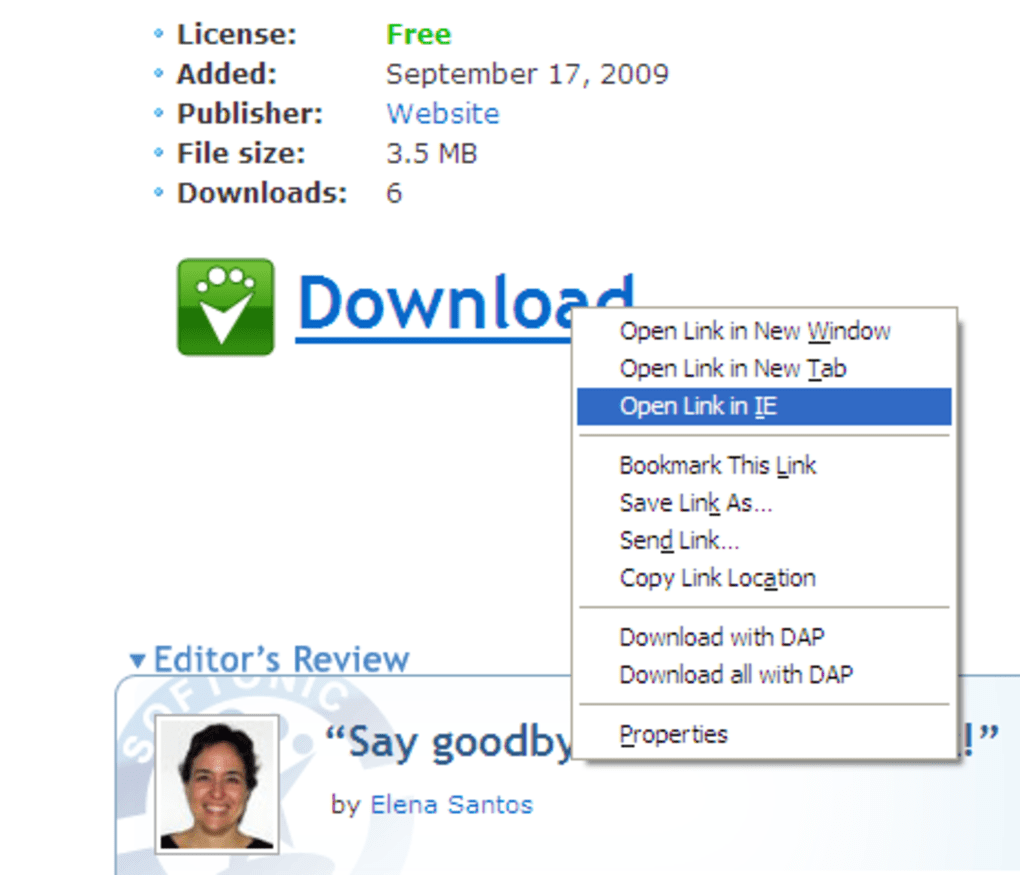
Open in IE is a lightweight Firefox add‑on designed to solve one very specific problem: the need to open a single web link in Internet Explorer while browsing with Firefox. In a world where most users have settled on one primary browser, there are still legacy web applications, corporate intranets, and older sites that only render correctly in IE. Rather than launching a separate IE window manually and copying the URL, Open in IE adds a single context‑menu entry – “Open Link in IE” – that does the job in one click.
The extension is free, has a tiny footprint, and requires virtually no configuration, making it an ideal tool for power users, IT professionals, and anyone who occasionally bumps into IE‑only content. Despite its minimalism, the add‑on is stable, works on current Firefox versions, and respects user privacy – it simply passes the URL to the system’s default IE executable. If you have ever felt the frustration of a site refusing to cooperate with Firefox, this extension offers a quick, secure, and hassle‑free workaround.
Features & Benefits
- One‑click “Open Link in IE” option added to the right‑click menu.
- Zero configuration – works out of the box after installation.
- Lightweight code base (under 15 KB) that does not slow down Firefox.
- Supports opening bookmarks, not just page links.
- Secure handling of URLs – no data is transmitted to external servers.
- Automatic updates through Firefox’s add‑on ecosystem.
- Works with all recent Firefox releases (Quantum and later).
- Free for personal and commercial use.
The primary benefit of Open in IE lies in its simplicity. By adding a single menu entry, it eliminates the need to switch between browsers manually, copy URLs, or remember obscure command‑line switches. This speed boost is especially valuable in corporate environments where internal tools still rely on IE’s rendering engine. Because the extension does not store any user data, privacy‑concerned users can rest assured that their browsing habits remain private. Moreover, the add‑on’s tiny footprint means it consumes negligible RAM and CPU, preserving Firefox’s performance while still offering the occasional IE fallback.
Installation, Usage & Compatibility
Installing Open in IE is straightforward. Open the Firefox Add‑ons Manager (about:addons), search for “Open in IE,” and click the “Add to Firefox” button. Firefox will prompt you to confirm the permissions required – essentially the ability to launch external applications. Once granted, the extension is installed instantly, and you’ll see the new “Open Link in IE” entry appear in the context menu for any hyperlink.
Using the add‑on is equally simple. While browsing, right‑click any link (or bookmark) you suspect may need IE, select “Open Link in IE,” and the link opens in a new Internet Explorer window. The process is seamless; Firefox remains open and untouched, allowing you to continue your workflow without interruption.
Compatibility is focused on Windows platforms, as Internet Explorer is a Windows‑only browser. The extension works on Windows 10, Windows 11, and older versions such as Windows 7, provided IE (iexplore.exe) is still present. For users on macOS, Linux, or mobile platforms (Android, iOS), the add‑on detects the absence of IE and disables the menu entry, avoiding confusion. The extension respects Firefox’s multi‑profile architecture, meaning each profile can enable or disable Open in IE independently.
Pros, Cons & Review Summary
- Pros
- Extremely lightweight – no noticeable performance impact.
- Zero‑configuration setup; works immediately after install.
- Improves productivity for users who need occasional IE access.
- Free and open to commercial environments.
- Secure, with no data sent to external servers.
- Cons
- Limited to Windows; no functionality on macOS or Linux.
- Only offers a single action – cannot customize IE launch parameters.
- Relies on the presence of Internet Explorer, which Microsoft is phasing out.
Overall, Open in IE delivers exactly what it promises – a quick, reliable bridge from Firefox to Internet Explorer. While its feature set is deliberately narrow, the absence of bloat and the flawless integration with Firefox’s UI make it a solid choice for anyone who still encounters IE‑only sites. The primary drawback is its Windows‑only nature, but that is inherent to the problem it solves. For the niche it targets, the extension scores a respectable 4 out of 5 stars.
Frequently Asked Questions
Do I need to have Internet Explorer installed for the add‑on to work?
Yes. Open in IE simply launches the system’s iexplore.exe executable. If IE has been removed or disabled, the menu entry will be greyed out.
Will Open in IE affect my Firefox browsing speed?
No. The extension is under 15 KB and adds only one context‑menu item. Users report zero impact on page load times or memory usage.
Can I customize which version of IE is used?
The add‑on always calls the default iexplore.exe found in Windows. Advanced users can change the system’s default IE path, but the extension itself does not provide a UI for custom parameters.
Is the add‑on safe for corporate environments?
Yes. Open in IE does not collect browsing data, transmit information, or require elevated privileges beyond launching IE, which is already permitted on most corporate Windows machines.
Will the extension continue to work after Microsoft retires IE?
If IE is completely removed from Windows, the add‑on will no longer be functional because there is no executable to launch. However, Microsoft has announced that IE will remain available for legacy support at least through 2025, giving users ample time to transition.
Conclusion & Call to Action
For Firefox users who occasionally stumble upon IE‑only content, Open in IE offers a no‑frills, secure, and instant solution. Its single‑purpose design eliminates the clunky process of manually opening IE, copying URLs, and juggling windows. While it only runs on Windows and cannot be heavily customized, those constraints are inherent to the problem it addresses. If you value a clean browsing experience and need a reliable fallback for legacy sites, this add‑on is worth a download. Click the button below to add Open in IE to your Firefox browser, enjoy seamless link switching, and keep your workflow uninterrupted.







